GET TO LEARN A BIT MORE
About Us.
HI, WE ARE RUBIN IT
We provide IT support for home and business. We have 15+ years of experience in the IT field with thousands of satisfied clients.
HOW WE WORK.
We truly listen to our customers. We try to make all repairs or sales as quick and simple as possible, and have very fast turnaround times. We provide clear, targeted support. We don’t sell you more or less than you need.
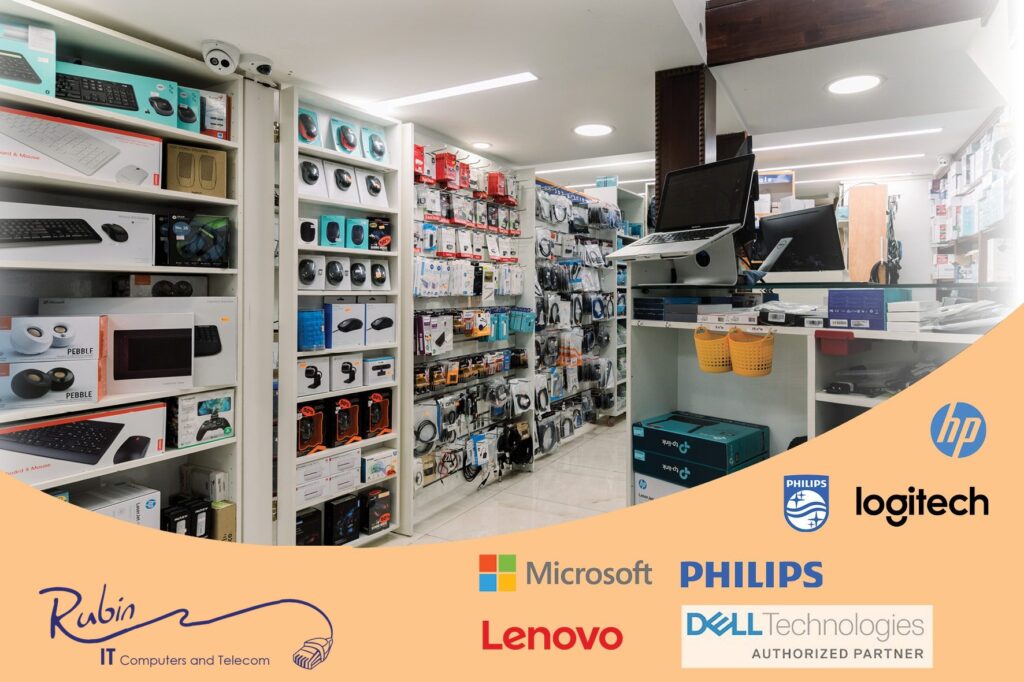
OUR STORE.
As dealers for all the major tech companies, we stock, or have quick access to all hardware available in Israel. We are authorized resellers of all your favorite brands including Dell, Lenovo, HP, Western Digital, Cisco, SonicWall, Ubiquiti, DrayTek and many more.
BUSINESS SERVICES.
WE WILL TAKE CARE OF YOUR BUSINESS OVERSEAS
FROM OUR OFFICES IN ISRAEL.
We partner with US-based IT departments and MSPs that need a reliable local presence in Israel. With 15+ years of experience and strong dealer relationships, we handle on-the-ground support, hardware procurement, setup, deployment, and logistics—fast.
We also provide local representation for installations and ongoing technical operations.
If your client needs a trusted address in Israel, we’re here to help..
SOME OF OUR FEATURED
Computer Repairs
Computer & Internet Rentals
Computer Sales
Backups
Backing up data is critical. We are providers of fully managed local and cloud backups for businesses.
Internet Lines
Data Recovery
There is no one answer to this question as the needs of each user and the capabilities of each filter are very different.
Filter types:
There are two main filter types.
1. ISP based filters, where the internet line is filtered at the source.
2. The second is device based filters, where the internet isn’t filtered but the device is.
Pros and cons of each.
Internet line based filters, AKA ISP based filters:
All internet coming into the house is filtered. Any device that is brought into the house will be automatically filtered if they are on the house Wi-Fi or cable.
(Note: This will not cover cell phones in the house that have their own internet source).
Cons: If you take your device out of your house or use a different internet connection you will not have any filtering on your device at ALL.
Filters on the computer, smartphone, or tablet itself:
Pros: Any Wi-Fi/internet connection you use will be filtered.
Cons: Other computers, smartphones, or tablets on your network will NOT be filtered.
Depending on how good the computer is, it may slow down your device.
Internet line filter (ISP) based options:
Rimon- Mediocre filtering and no image filtering options. The system is very generalized and run by computer analysis and geared towards the dati community. You can install a program on your computer that will not allow it to connect to the internet unfiltered outside of your house, but the program is very buggy and unstable, we have had terrible issues with it. Like all line based filters this won’t slow down your computer as much but the program has serious issues.
Etrog – Much tighter filtering from the same company as Rimon, geared towards the Frum community. This has much better filtering, but is really more of a whitelist.
Netfree – is a very good filter. The king of ISP filters and the standard required by many communities. It is through the internet line. It is cheap compared to the others. It only works with specific Internet Service Providers. You cannot use regular Bezeq binleumi. You will need to switch to an Internet provider that they support. Netfree’s support is very good and they genuinely try to help, but it’s limited to what they will agree to open. You can add a lock to the computer to only allow it to use Netfree internet so even out of the home it will only connect to filtered Netfree internet. If the level of filtering is good for you its the best option out there by far. They also have a VPN option where you can filter the computer even when not on a Netfree line, but it’s not recommended long term.
Device Based:
Techloq- Great filtering with a ton of options. Good, English speaking support. You pay per device. We highly recommend having a good computer for device based filters so it will not slow down your computer. Higher cost relative to ISP based filter but can be better fit if English speaking support is important and super customizable like no other filter.
NativUSA- Great filtering if you want a WHITELIST, not as customizable. English speaking support, but mostly US hours (as of this writing). You pay per device. We highly recommend having a good computer for device based filters so it will not slow down your computer. Higher cost relative to ISP based filter but can be better fit if English speaking support is important.
GenTech – Works on many types of devices, more popular in the US than here, personally haven’t loved the tech support, but the filtering is good.
Processor: For everyday home or business use, get an Intel Core i5 or Core Ultra 5 or better. A Core i3 is fine for light use. For graphics or heavy work, choose a Core i7 or Ultra 7. Basic Celeron, Pentium or “Intel Processor” models are only for typing and very light web use. We stock Intel laptops. In our experience AMD laptops have more sleep, wake and stutter problems, so we don’t recommend them for everyday work.
Special uses: For Otzar HaChochma, or to run a frum filter like Nativ, Techloq or GenTech, get an i5 with 16GB of RAM.
Memory (RAM): 16GB is the sensible minimum for Windows 11 today. 8GB works only for typing and light browsing. Use 32GB for graphics, video or heavy multitasking. Many newer laptops have the memory built in, so buy enough up front.
Storage: SSD only. 256GB is the minimum for daily use, 512GB is better, and graphics work needs 1TB.
Brand: There are thousands of options, so pick your specs first and then check reviews. We have had the best luck with Dell, then Lenovo and HP, which post driver and support updates for years. Every brand makes some weak models. We haven’t seen top-priced laptops last much longer than mid-range ones, since you mostly pay for features and looks. In our experience Acer and Asus have limited parts and driver support after purchase.
We are dealers in Israel for all the brand-name computers. We offer a fully set-up computer, with Hebrew letters on the keys (no stickers), the manufacturer’s Israeli warranty, registered Windows and Office, and whatever basic programs you need. Our Windows installs are up to date, clean and fast, with no extra junk to slow you down.
Contact us for a current list of the laptops we have in stock.
Inkjet vs. laser
We would love to say forget inkjets altogether. They print slowly, jam often, the ink runs when it gets wet, and the cartridges dry out if they are not used often. Getting cartridges recognized is a constant struggle, and generic cartridges are nowhere near the quality of the originals, at best hit and miss. Basically a white elephant: cheap to buy but a huge pain in the long run.
Laser printers
Even among lasers there is a range. The smaller lasers are not junk, but they are not meant for a full-size office or heavy use. A decent small-office laser is faster and prints at higher quality, and its toner gives about 1,500 to 3,500 pages.
A mid-size office laser costs more up front, but the toner costs only a little more, even for generic, and prints 8,000 to 18,000 pages. It pays for itself in about six months, and the machine jams much less, prints faster and holds more paper.
For commercial use it usually makes sense to lease.
Color
Color machines cost more, and a color toner gives only about 1,000 to 1,500 pages, while a black-and-white machine in a similar price range gives around 9,000 pages per toner. Color is a much more commercial machine, so it is usually cheaper, more efficient and longer-lasting to have two separate machines.
Stock and prices change often, so contact us for current options.
People often confuse cloud sync (Google Drive, Microsoft OneDrive, Dropbox, iCloud) with cloud backup. Sync mirrors your files across your devices, so a deleted or damaged file disappears everywhere. A backup keeps separate copies you can go back to.
For a plain-language guide, read our article Keep Your Photos, Documents and Messages Safe Without Being Technical on The Park Circle.
Backup in a nutshell: Follow the 3-2-1 rule. Keep 3 copies of any important file (1 primary and 2 backups), on 2 different types of media, with 1 copy offsite (outside your home or business).
Local backup and cloud backup: You should use both.
Pros of local: Fast to back up to and to recover from, and independent of internet speed, availability and stability.
Cons of local: Vulnerable to the same problems as the computer it backs up, such as theft, fire, flood, drive failure and viruses.
Pros of cloud: Not affected by those physical problems, and not prone to viruses. Proper versioning and file history, so you can retrieve a file as it was before you changed or deleted it.
Cons of cloud: Backing up and recovering all your data takes time and depends on network stability. For individuals or businesses that need a fast full recovery after a disaster, local backup is necessary too.
Our backup services: We set up and manage backups for homes and businesses. Semi-managed backups start from $8 a month per device. Fully managed backups, where we monitor and manage your backups for you, start from $15 a month for the first device, with lower rates for additional devices. Managed backups have a one-time setup fee. Contact us for a quote.
Pro: Desktops initially aren’t cheaper but you even the cheapest ones we sell can still be a pretty powerful system, the box is larger the parts are larger, and this also means the desktop processors can be more powerful than laptop processors.
Pro: Desktops can make use of full-size keyboards and are more comfortable to use long term. The screens are bigger and more ergonomically placed.
Pro: Most components in a desktop are removable, making it easier to upgrade. Desktop cases are larger, providing more room inside to upgrade if needed and add hardware.
Pro: Repairing a desktop computer is generally easier because most of the hardware can be purchased off the shelf of any local computer retail store. The desktop computer chassis is also much bigger and easier to work with than a laptop making repairs and upgrades cheaper.
Con: Desktops need a dedicated space.
Laptops:
Pro: Laptops are portable. They are great for on-the-go use.
Con: For most users, opening a laptop to repair a part can be difficult, and finding a replacement part often requires calling the computer manufacturer or ordering from China and waiting weeks for parts to arrive.
Con: To get a more powerful laptop (higher speed, better graphics, more storage space, etc.), the price can be considerably higher and still won’t be as fast or reliable as a desktop with the same specs.
Con: Memory and hard drive are the only components that can be upgraded in a laptop. A need to upgrade anything other than the hard drive and memory usually requires a new laptop.
In other words, if you want the most bang for your buck and portability is not necessary, a desktop is likely the best choice. Desktops are optimal choices for graphic-intensive gaming, use of CAD applications, and for those who prefer to have the reliability and option of upgrading more easily.
A few good habits prevent most computer problems. Our short guide on The Park Circle covers six of them in plain language: The 6 Computer Habits That Prevent Most Problems.
Stop using the computer for banking or email until it has been checked, and read our short guide on what to do next: That Email Looked Real. Now What? If you are worried, call us.
Bring a credit card for the deposit. There is usually a minimum rental of two days. Contact us to check what is available. Pickup and drop-off locations and our hours are listed at the bottom of this page.
WHAT PEOPLE SAY ABOUT US
WANT TO FIND OUT MORE?
RUBIN IT
- Oholei Yosef 3, Jerusalem, Israel
- 02-563-6018
- +1 (732) 523-5479
- support@rubinit.net
- OPENING HOURS
- Sun - Thurs: 9:15am - 7:30pm
- Friday: 9:15am - 12:00pm
-
ROMEMA -SOROTZKIN
PICKUP & DROPOFF LOCATION - 072-316-7712
-
ROMEMA - SHAMGAR
RENTAL LOCATION - 077-890-3944


